


Fluent Validation in ASP .NET: Get clear rules and error messages.
How to cope when we want to validate fields more extensively or want to change validation rules while our application is running? The solution is the library Fluent Validation, which is maintained by the .NET Foundation.
Fluent pattern
Fluent Interface - a concept dating back to 2005, when Eric Evans and Martin Fowler introduced it to the world during their Domain Driven Design workshops. This pattern allows the programmer to modify/configure an object by chaining method calls.
With the advent of the LINQ library and the Entity Framework, this pattern has become established in the world of the .NET platform.
Advantages
When we talk about the advantages of Fluent API, it is impossible to mention the significant improvement in the readability of the code by reducing it to a domain cause-and-effect sequence. Another advantage that is widely used as an argument is that the Fluent approach hides implementation details, focusing on describing business rules.
Example comparison of the Fluent interface with the classic approach:
//old approach
var order = new Order();
order.Items.Add(new Item("Item 1",1));
order.Items.Add(new Item("Item 2",1));
order.User = new User();

//Fluent
var order2 = new Order();
order2
			.AddProduct("Item 1",1)
			.AddProduct("Item 2",1)
			.WithUser();
Defects
In contrast to the advantages, we encounter arguments that code written using the Fluent approach is difficult to debug or log individual states of objects. Another inconvenience is difficult implementation in strongly typed languages, because in the case of inheritance, the inheriting class must override all Fluent methods and return its instance.
Example of a problem resulting from a type change:
class A {
    public A DoMagic() { }
}
class B : A {
    public B DoMagic() { super.DoMagic(); return this; } // Must change return type to B.
    public B DoMoreMagic() {return this;}
}
class C : A {
    public C DoMoreMagic() {return this;}
}

var b = new B();
b.DoMagic().DoMoreMagic(); //it works!

var c = new C();
c.DoMagic().DoMoreMagic(); //kaboom!
Fluent API – Definition of validation functions
It is worth taking a closer look at the Fluent Validation library, which is the key to this article. However, what if we described the rules using the Fluent definition? In the case of Fluent Validation, this is trivial.
Sample code of checking rules with invocation for the POCO class Person:
public classPerson
{
  public int Id { get; set; }
  public string Name { get; set; }
  public string Email { get; set; }
  public int Age { get; set; }
  public string PostCode {get;set;}
}

public class PersonValidator : AbstractValidator
{
  public PersonValidator()
  {
    RuleFor(x => x.Id).NotNull();
    RuleFor(x => x.Name).Length(0, 10);
    RuleFor(x => x.Email).EmailAddress()
                         .WithMessage("Please ensure that you have entered your Email");
    RuleFor(x => x.Age).InclusiveBetween(18, 60);
    RuleFor(x => x.PostCode).Must(BePolishPostcode);
  }

  private bool BePolishPostcode(string postcode)
  {
     //...
  }
}

var _validator = new PersonValidator();
var results = await _validator.ValidateAsync(person);

if(!results.IsValid)
{
  foreach(var failure in results.Errors)
  {
    Console.WriteLine("Property " + failure.PropertyName + " failed validation. Error was: " + failure.ErrorMessage);
  }
}
As you can see, we can separate our validator into a separate class, and because class Abstract Validator, implements the interface IValidator we can also register such a validator in Dependency Injection.
Of course, the library's capabilities do not end with simply checking the rules for fields in the class and returning errors. We can define validators conditionally:
RuleFor(person => p.Age).GreaterThan(30).When(p => p.Name.Contains("Old"));
What if we need to define our own validator because the built-in ones do not meet our requirements? All we need to do is build an extension and return method IRuleBuilderOptions
//taken from docs -> https://docs.fluentvalidation.net/en/latest/custom-validators.html
public static class MyValidators {
    public static IRuleBuilderOptions> ListMustContainFewerThan(this IRuleBuilder> ruleBuilder, int num) {
        return ruleBuilder.Must(list => list.Count < num).WithMessage("The list contains too many items");
    }
}
For more functionality please refer to project documentation.
REST API
We will implement the use of Fluent Validation in the context of the RES interface using the example of a simple calculator project issuing 3 endpoints:
- Addition
- Division
- Subtraction
Project configuration
We will start by creating a project and installing the library:
dotnet new webapi -minimal
dotnet add package FluentValidation
We will define records responsible for requests to Endpoints:
public abstract record CalcRequest(double A, double B);
public record AddRequest(double A, double B): CalcRequest(A,B);
public record SubRequest(double A, double B): CalcRequest(A,B);
public record DivRequest(double A, double B): CalcRequest(A,B);
The next step is to define validators:
public class CalcRequestValidator : AbstractValidator
{
    public CalcRequestValidator()
    {
        RuleFor(x => x.A).NotEmpty();
        RuleFor(x => x.B).NotEmpty();
    }
}

public class AddRequestValidator : AbstractValidator
{
    public AddRequestValidator()
    {
        Include(new CalcRequestValidator());
        //my dummy rule, just for demo purposes
        RuleFor(x => x.B).GreaterThan(10);
    }
}

public class SubRequestValidator : AbstractValidator
{
    public SubRequestValidator()
    {
        Include(new CalcRequestValidator());
        //my dummy rule, just for demo purposes
        RuleFor(x => x.B).GreaterThanOrEqualTo(-10);
    }
}

public class DivRequestValidator : AbstractValidator
{
    public DivRequestValidator()
    {
        Include(new CalcRequestValidator());
        //my dummy rule, just for demo purposes
        RuleFor(x => x.B).NotEqual(0);
    }
}
Use in ASP REST API
Once we have prepared the project base, it's time to start using it.
The first step will be to register our validators in the Dependency Injection container:
builder.Services.AddScoped, CalcRequestValidator>();
builder.Services.AddScoped, AddRequestValidator>();
builder.Services.AddScoped, DivRequestValidator>();
builder.Services.AddScoped, SubRequestValidator>();
Now all we need to do is write the REST extensions. In my case, I used the Minimal API concept. It is important to inject minimal api into controllers/methods IValidator:
app.MapPost("/calc/add", async ([FromServices] IValidator validator, [FromBody] AddRequest req) =>
    {
        var valResults = await validator.ValidateAsync(req);
        if (valResults.IsValid == false)
        {
            return Results.ValidationProblem(valResults.ToDictionary());
        }

        return Results.Ok(req.A + req.B);
    })
    .WithName("CalcAdd")
    .ProducesValidationProblem(400)
    .Produces(200)
    .WithOpenApi();

app.MapPost("/calc/div", async ([FromServices] IValidator validator, [FromBody] DivRequest req) =>
    {
        var valResults = await validator.ValidateAsync(req);
        if (valResults.IsValid == false)
        {
            return Results.ValidationProblem(valResults.ToDictionary());
        }

        return Results.Ok(req.A / req.B);
    })
    .WithName("CalcDiv")
    .ProducesValidationProblem(400)
    .Produces(200)
    .WithOpenApi();

app.MapPost("/calc/sub", async ([FromServices] IValidator validator, [FromBody] SubRequest req) =>
    {
        var valResults = await validator.ValidateAsync(req);
        if (valResults.IsValid == false)
        {
            return Results.ValidationProblem(valResults.ToDictionary());
        }

        return Results.Ok(req.A - req.B);
    })
    .WithName("CalcSub")
    .ProducesValidationProblem(400)
    .Produces(200)
    .WithOpenApi();
Of course, this is just a model example to show the principle. Production-wise, it would be worth reducing repetitive code.
After running the project and executing the sample query, we should receive the validation results:
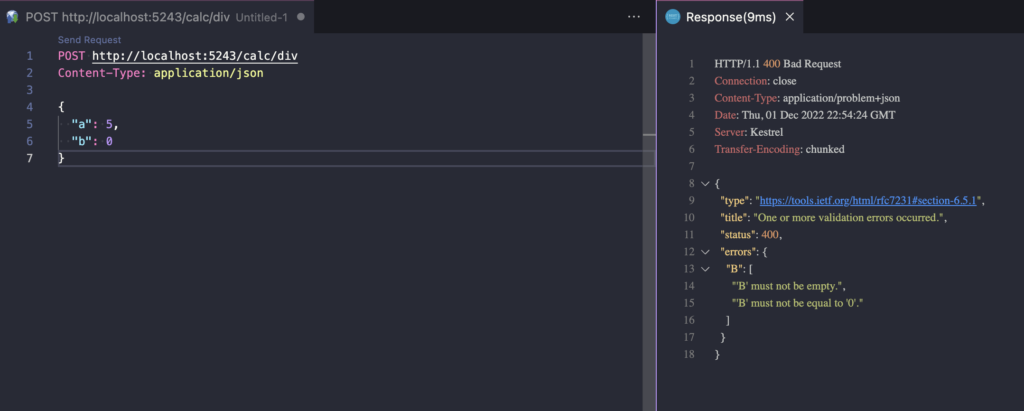
The entire demo application code is available at Github
Summary
To sum up, when we expect something more compared to attribute validation, and we value the ability to configure validators in the code, the Fluent Validation project is the perfect solution to our problems.
However, as usual, we choose the validation solution based on the application and project. Sometimes the Data Annotations approach may be fully sufficient for our project.