

From everyday task chaos to automatic messenger notifications - your team is always up to date, effortlessly!
What will you find in the article?
- Why automate daily task reminders?
- How does it work step by step? Our n8n workflow.
- What will your team (and Project Manager) gain?
- Flexibility and adaptation to your tools.
- Frequently asked questions (FAQ)
1. Why automate daily task reminders?
For many teams, especially those working remotely or hybrid, daily prioritization and reminders of tasks can be time-consuming. Project Managers spend valuable minutes preparing summaries, and team members must actively seek information. This generates some common problems that we also faced:
- Waste of Project Manager's time: Preparing daily task statements, checking statuses and providing individual reminders took up time that could have been spent on strategic activities.
- Risk of missing tasks: Amidst the overflow of information, it's easy to forget about a less urgent but important task.
- No immediate sync: Information about priorities may have arrived late, causing disorganization.
- Less team productivity: The need to constantly ask about tasks distracted me from working with concentration.
By implementing an automatic notification system, we managed to eliminate these problems, providing clarity to the team and saving our Project Manager's time.
The tool we chose to create this automation is a comprehensive low-code/no-code platform – n8n. It allows you to easily connect different applications and automate workflows without having to write complex code.

2. How does it work step by step? Our n8n workflow.
Every morning, our automated system downloads current tasks from YouTrack (our project management tool) and publishes a clear summary on a dedicated Discord channel (which we use for corporate communication), tagging the right people. Here's how the process works:
- Launch at scheduled time (Schedule Trigger):
The workflow automatically starts every business day at a set time (e.g. 8:00 a.m.) to provide fresh information to start your day. - Checking the day of the week (Weekend Checker):
A simple script verifies whether the current day is a business day. If it is a weekend, the process stops to avoid sending notifications unnecessarily. - Downloading tasks from YouTrack (HTTP Request):
n8n connects to the YouTrack API and downloads a list of tasks that meet certain criteria (e.g. they are in the "In Progress" status or assigned to a specific sprint/project). We are interested in details such as the task ID, its title, assigned person and priority. - Filtering and sorting tasks (Filter & Code Node):
Downloaded tasks are filtered to select only those that are relevant to your daily summary (e.g. active, incomplete). Tasks are then sorted by assignee and priority to make the message as clear as possible. - Preparing a message on Discord (Code Node):
Based on the processed data, n8n dynamically creates a formatted message. The message contains a list of tasks grouped by responsible person, the priority of each task, its title, a unique ID and a direct link to the task on YouTrack. Importantly, the system automatically tags (@mention) appropriate users on Discord. - Sending a notification to Discord (Discord Node):
The finished message is published on the selected company Discord channel, thanks to which the entire team has easy access to the current task list.
Would you like to see this workflow in action or adapt it to your needs?
Check out the ready-made workflow template on the n8n platform!
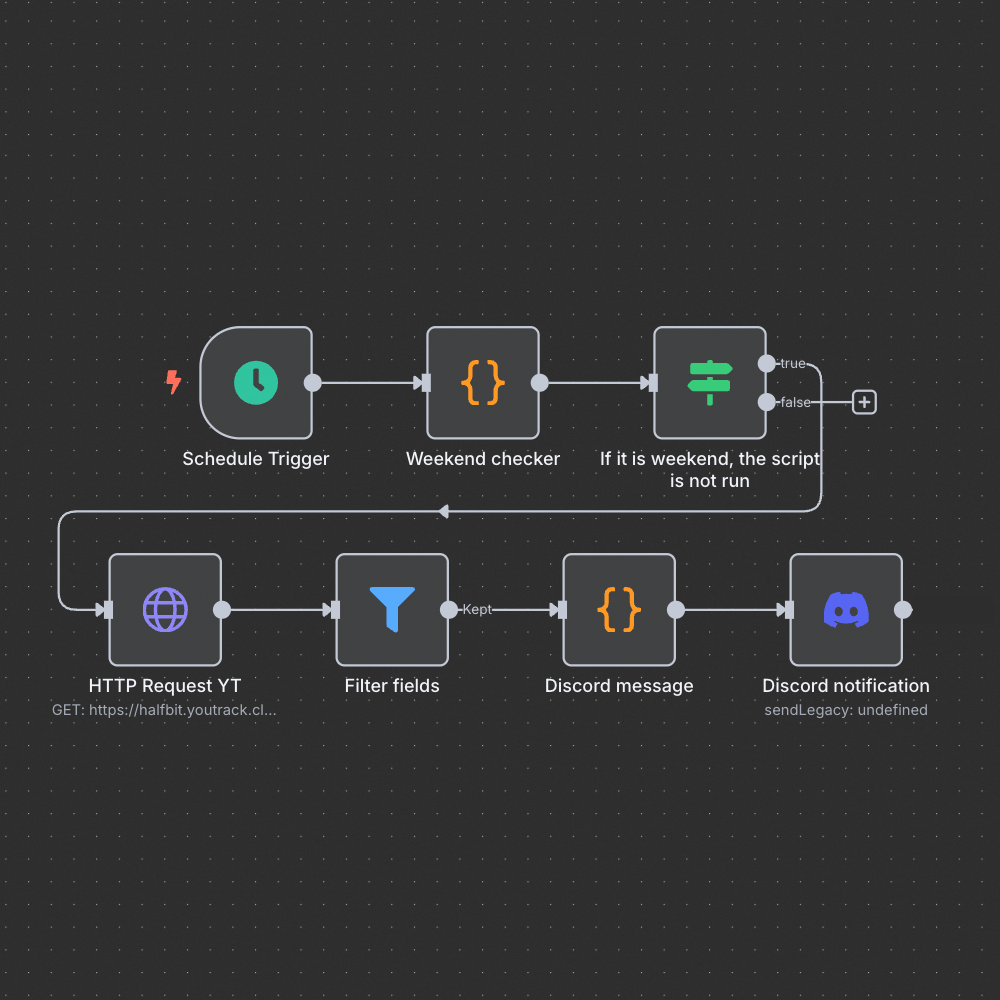
An example process diagram built in the n8n environment, downloading tasks from YouTrack and sending them to Discord.
3. What will your team (and Project Manager) gain?
Implementing this simple automation has brought us a number of benefits:
- Saving Project Manager time: No more manual preparation of daily summaries. This time can be spent on more strategic tasks.
- Better organization of team work: Every team member knows from the morning what tasks they are assigned and what their priorities are.
- Increased transparency: Everyone has access to the same information in one easy-to-access place.
- Reducing the risk of missing tasks: Automatic reminders minimize the risk that an important task will be forgotten.
- Improving communication: Less need to ask about statuses and tasks, which improves the flow of information.
- Greater focus on tasks: The team can get to work straight away with a clear understanding of their responsibilities.
4. Flexibility and adaptation to your tools
Although in our example we used YouTrack as the task management system and Discord as the messenger, the beauty of the n8n platform is its flexibility. You can easily adapt this workflow to other popular tools such as:
- Project management systems: Jira, Asana, Trello, Monday.com, ClickUp, etc.
- Team messaging: Slack, Microsoft Teams, Mattermost, etc.
Thanks to a rich library of ready-made integrations (nodes) and the ability to create your own connections via API, you can adapt this process to the specificity of the tools used in your company. The workflow template linked above is a great starting point for your own modifications.
5. Frequently asked questions (FAQ)
Do I need advanced programming skills to implement this?
Not necessarily. n8n is a low-code/no-code platform, which means many automations can be built using a graphical interface and pre-built blocks (nodes). Basic knowledge of API operation logic or simple scripts (e.g. JavaScript for data formatting) may be helpful for more advanced modifications, but a ready-made template makes getting started much easier.
How long does it take to implement such automation?
Using a ready-made workflow template, configuring the basic version may take from several dozen minutes to several hours, depending on your knowledge of n8n and the specifics of integration with your systems (e.g. API authorization). More advanced customizations may require more time.
Can I integrate tools other than YouTrack and Discord?
Yes, definitely! n8n offers hundreds of ready-made integrations with popular business applications, databases, instant messengers and more. If there is no ready-made node, you can often use a generic HTTP Request node to connect to any service's API.
What is the issue of data security?
If you use n8n in the self-hosted version (installed on your own server), you have full control over the flow of data - it does not leave your infrastructure. API keys and credentials are stored in n8n and secured appropriately. However, good security practices should always be followed when managing API access and keys.
Where can I find a ready template for this workflow?
A workflow template for automating notifications from YouTrack to Discord is available on the official n8n website at this link: https://n8n.io/workflows/4019-automate-daily-youtrack-task-summaries-to-discord-by-assignee/.