


So far, all our applications have been put into production on a dedicated server from the OVH offer or on a great service micro us created by Jakub Mrugalski, well-known in the industry.
This solution had one undeniable advantage - we were "self-hosted", without having to worry about unclear price lists or cost estimates. Unfortunately, this solution had many drawbacks. First of all, we had to take care of the security of the equipment, updating the system on the server and firewall rules ourselves. Moreover, it has also become burdensome to transfer knowledge within the team about how to administer the system and how the infrastructure is built.

Cloud to the rescue!
We've made the decision, we're moving to the cloud! The arduous search for the right solution for us began. After reviewing the giants' offers, it stayed on the battlefield Fly.io.
Fly.io is an American cloud solutions provider centralized in the Developer experience. We will not provide complicated services with unknown names or unclear price lists.
Preparations
So far, our deployment process was based on docker containers that we built via Github Actions. Ultimately, we represented our environments by appropriate docker-compose files. Unfortunately, this approach proved impossible to implement in Fly. We started to come up with a plan to migrate our applications.
Application migration
We have separated our docker-compose files into individual applications in separate repositories. Then, each application received a dedicated file, in accordance with the documentation fly.toml, in which we define the application name, watchdog rules, and related services.
app = "backend"

[[services]]
  internal_port = 5000
  protocol = "tcp"
  [services.concurrency]
    hard_limit = 25
    soft_limit = 20

  [[services.ports]]
    handlers = ["http"]
    port = "80"

  [[services.ports]]
    handlers = ["tls", "http"]
    port = "443"

  [[services.tcp_checks]]
    interval = 10000
    timeout = 2000

[mounts]
source="files_volume"
destination="/files"
The next step was to modify the pipeline in Github Actions to perform deployment.
Sample Github flow:
name: Fly Deploy
he:
  push:
    branches:
      -main
env:
  FLY_API_TOKEN: ${{ secrets.FLY_API_TOKEN }}
jobs:
  deploy:
      name: Deploy app
      runs-on: self-hosted
      steps:
        - uses: actions/checkout@v3
        - uses: superfly/flyctl-actions/setup-flyctl@master
        - run: flyctl deploy --remote-only
And that's it!

and the truth is, that's all :) Fly will take care of finding it for us Dockerfiles , build the image, and then run it on the swap slot. Simple, right?
Monitoring
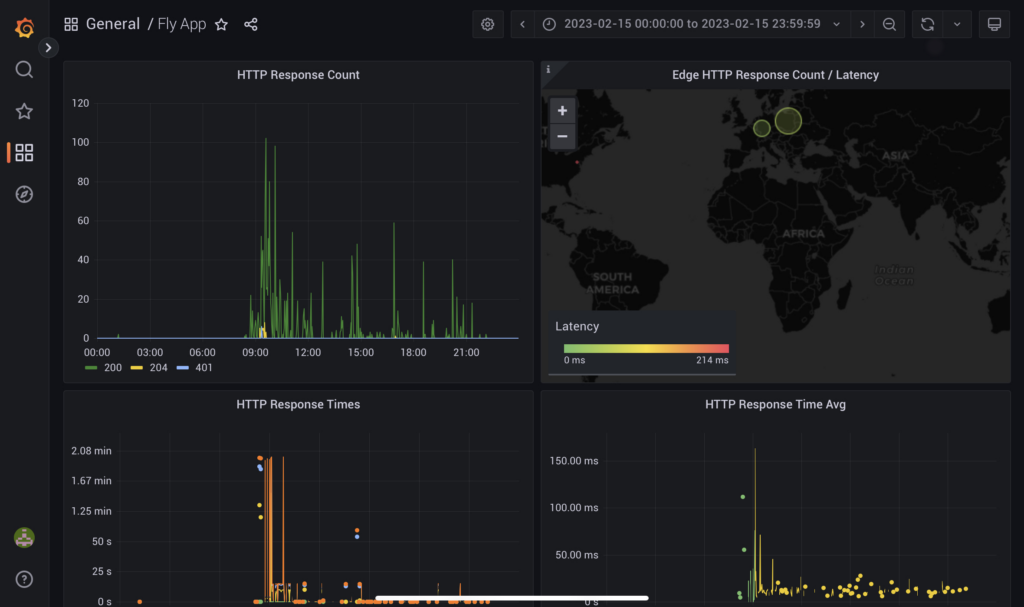
Another aspect we fell in love with on Fly. Immediately after deploying the application, we gain access to Grafana, where we can view basic metrics such as response time and network traffic. Additionally, we can push our own metrics via Prometheus.
CLI
The interface available through the browser provides an ascetic experience - we won't do much with it. We will only see the claws when we examine the console interface - flyctl.
Thanks to it, we interact with the cloud, we can, among other things, restart the application or scale it up or down. However, what sold our hearts was the ability to redirect any port of our application to the local computer, practically the same as in Docker.
The command line will also allow us to dive into the container via SSH or view the logs using the command flyctl logs.
Secrets
We also receive a secret keeping service free of charge. It is not as extensive as, for example, Azure Vault, but it does its job. Secrets are injected into the application container in the form of environment variables that can be used in our application.
Postgres

A definite Gamechanger!
All of our projects using a relational database have Postgres under the hood.
And here Fly.io also meets our needs by providing a PostgreSQL cluster that we can manage in any way. Among other things, we can dynamically scale the number of resources and the number of nodes. Additionally, we have the option of running TimescaleDB.
Was it worth it?
Definitely yes! Despite the initial difficulties associated with changing the architecture, we achieved a scalable and stable environment without having to worry about infrastructure and costs (which are relatively low for a cloud solution). Of course, there will be a spoonful of tar in this jar of honey. Fly.io is not a solution that lacks good support from the manufacturer. Fortunately, we get very good documentation and a community forum in return.
Fly.io is definitely a good alternative if we are looking for a cloud that will not overwhelm us with the number of functions and a complicated price list that is based on estimates. In return, however, we must learn to manage from the command line and to the lack of technical support other than the community.