

From an email with a PDF to an entry in the accounting system i
team notifications – all automatically, without clicking.
What will you find in the article?
- Why is it worth automating invoices?
- How does it work step by step?
- What will your company gain?
- Savings calculator
- Security and control
- Frequently asked questions (FAQ)
1. Why is it worth automating invoices?
Many companies, even using modern ERP systems, still manually copy invoices from e-mails. This causes three big problems that also affected our company:
- A lot of unnecessary work: our accountants lost up to 65 on average
hours per month for transcribing data. - Mistakes that cost: as many as 5% of manually entered invoices contained
mistakes. - Payment delays: manual operation took us from 24 to
48 hours.
Thanks to the implementation of automation, we managed to reduce the invoice handling time by over 90%, and the number of errors dropped to virtually zero. The investment paid off after just 2 months.
The tool we chose to create automation is a low-code/no-code solution – the n8n platform.

2. How does it work step by step?
- Receiving an invoice email
The system automatically checks your inbox and downloads new e-mails with PDF attachments (e.g. invoices). - Attachment verification
Using built-in JavaScript code, the system analyzes attachments and selects only those that are in PDF format. - Content extraction from a PDF file
Invoice data is extracted from the PDF file (including text, invoice number, contractors, total, payment date). - Invoice analysis by AI
The extracted information is sent to a language model (e.g. GPT), which identifies whether the document is an invoice and extracts detailed data. - Data structuring
The system transforms AI responses into a standardized JSON format, e.g. divided into: seller, buyer, invoice items, amounts, currency, payment date. - Validation - Is it an invoice?
If the system does not recognize the document as an invoice, it stops processing. Otherwise, it proceeds to the next steps. - Registration in the database
Based on the invoice data, the system checks whether the issuer exists in the company database (e.g. PostgreSQL). If so, you can register an entry. - Team notification (optional)
If the invoice has passed the entire process, the team receives a notification on Microsoft Teams with a summary of the invoice (number, contractors, amounts, payment deadline, etc.).
- Receiving an invoice email
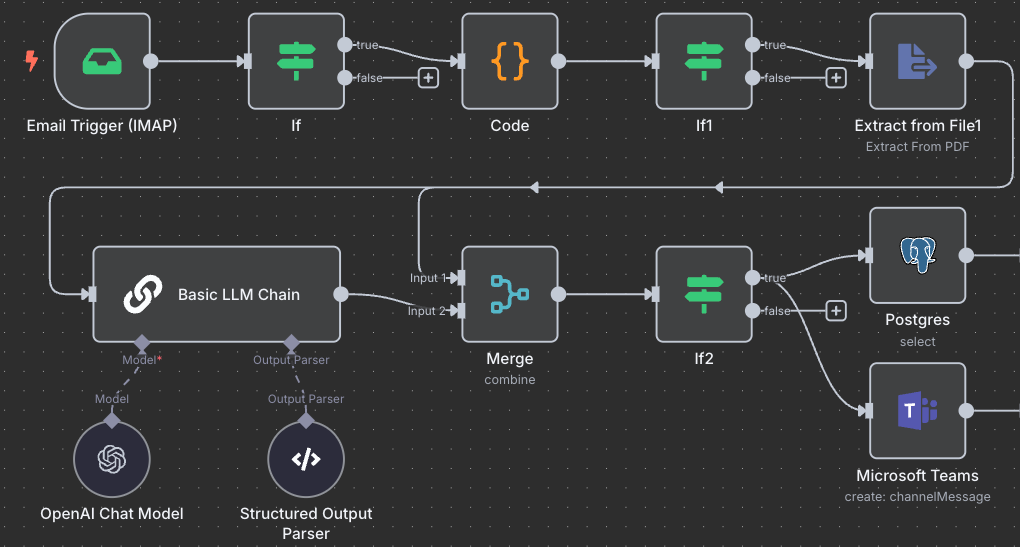
Process diagram built in the n8n environment
3. What does your company gain?
- Less work for accounting: on average you save 40 hours per month.
- Instant invoice processing: from 24 hours to 5 minutes per invoice.
- Error reduction: thanks to automatic data control.
- Easy access to your invoice history: data and PDFs in one place.
- Easy scaling: adding another box or branch is simple and quick.
4. Savings calculator
See how much time and money you can save!
Enter the monthly number of invoices – we will calculate the rest for you.
You save: 66 hours and 1980 PLN per month.
The calculations presented in the calculator are based on a typical scenario of internal accounting work in a small or medium-sized company:
- Average time to manually process one invoice: 40 minutes (0.66 hours)
- Average hourly cost of an accountant (including ZUS and employer's costs): PLN 65/h
Results may vary based on your company's actual invoice volume and staffing costs.
5. Security and control
- Hosting on your own server: data never leaves our infrastructure, and only authorized team members have access to processes.
- Open-source: we can independently review the n8n code, conduct audits and adapt the solution to our own security policy requirements.
- Full control: we maintain full control over the processing of invoices, from receipt to entry in the accounting system.
Frequently asked questions (FAQ)
Do I need an IT department to implement such a system?
NO. The solution is based on the so-called low-code/no-code approach, which means that
no programming required. You can outsource the implementation to an external contractor or
use a ready-made process template. Entrepreneurs who have no background
technical, they can also start working with such a system without any problems.
How long does it take to implement automation?
Full implementation takes from a few days to a week - depending on the number of boxes
email and accounting systems that need to be integrated with. In simple cases, your first invoices can be processed automatically within 2-3 days
days.
What savings can I get?
On average, companies save approx. 66 hours of work per month for each person involved in manual transcription of invoices. This means real savings of several hundred zlotys per month for just one employee - or much more for larger teams.
Is invoice automation safe?
Yes. Automation using platforms such as n8n allows for complete
control over data because the system can run on your own server –
you don't have to send documents to external suppliers. Data does not leave your infrastructure, which significantly increases security, especially with data
sensitive information such as Tax Identification Number, amounts or invoice numbers.
Does this solution work with my ERP system?
Yes - the n8n system supports integration with popular tools, and if necessary, you can also create a connection with less popular systems via API or e-mail support. Integration can cover accounting systems, CRM, Google Workspace and many others.
What if the arrangement of my invoices changes?
The system is not rigidly set to one invoice format - it reads the data dynamically, so you don't have to worry about what the invoice entering the system looks like.